 Pulse
Pulse
Real-time collaboration for any website.
Comments pinned to pixels, live cursors, presence, reactions, and shared data — added to your product with a single HTML tag, running on your own server.

<!-- 1. load the SDK -->
<script type="module" src=
  "https://pulse.hire.rest/sdk/pulse-elements.js">
</script>

<!-- 2. drop the widget -->
<pulse-widget
  api-key="pk_your_key"
  token="…from your backend"
  room="dashboard"
  endpoint="wss://pulse.hire.rest">
</pulse-widget>

# or with a bundler
npm i @gamention/pulse-elements
Your users see each other. On your site.
Below is our live demo, running the widget you'd ship — comments panel, pinned thread, presence, and the room's heartbeat. Open it in two tabs and watch them sync.
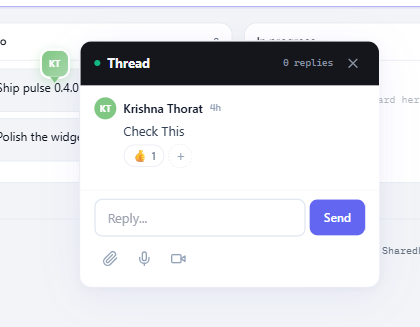
Everything a multiplayer page needs.
One tag adds the full collaboration layer. Every feature is enforced server-side per environment, so you decide what each tenant gets.
Comments pinned to pixels
Threads anchored to the exact spot they're about. Creators drag their pins; everyone sees the move live.
Live cursors & clicks
Color-coded cursors with names, click ripples, and shared text selections — throttled and smooth.
Presence & follow
Who's here, live in the toolbar. Click a teammate to follow their scroll for walkthroughs and reviews.
Notifications that navigate
Mentions, replies, and reactions land in an inbox. Click one and the page scrolls to the pin and opens it.
Media notes
Attach images, in-browser voice notes, and video clips to any comment. Lightbox and players included.
P2P shared data
Optional CRDT-backed SharedMap, SharedList, and SharedCounter over WebRTC — with server persistence for late joiners.
Self-hosted, multi-tenant
Your Postgres, your keys, your data. Tenants, environments, and API keys managed in the admin panel.
Themeable to the pixel
CSS custom properties for every surface — brand colors, dark mode, header caps, fonts, radii.
Live in three steps.
Your backend mints a short-lived token with your secret key; the widget does the rest. Full walkthrough in the Quick Start guide.
npm i @gamention/pulse-elements

// no build tools?
<script type="module" src=
  "https://pulse.hire.rest/sdk/pulse-elements.js">
</script>
// Node.js — any framework works the same way
const res = await fetch(
  "https://pulse.hire.rest/auth/token",
  { method: "POST",
    headers: { Authorization: "Bearer sk_…" },
    body: JSON.stringify({ userId, name }) }
);
const { token } = await res.json();
<pulse-widget
  api-key="pk_your_publishable_key"
  token="{token}"
  room="dashboard"
  endpoint="wss://pulse.hire.rest">
</pulse-widget>
Pins that survive your next redesign.
Percentage-based pins drift the moment a layout reflows. Pulse anchors every pin with barycentric coordinates against three stable DOM landmarks, then degrades gracefully through four tiers instead of disappearing.
- ✓Tier 1–2: triangulated against 3 landmarks; still solves with 2
- ✓Tier 3: element-relative offset when landmarks vanish
- ✓Tier 4: document-fraction fallback — a pin never just vanishes
- ✓Movable: creators drag their pins; moves sync and persist